Software release cycles keep shrinking, and testing teams are expected to keep pace without sacrificing reliability. Automation has become a core part of modern software delivery, but writing more scripts does not automatically lead to faster feedback, stronger coverage, or more dependable releases.
Teams getting real value from automation treat it as an engineering discipline integrated with the wider QA and software delivery process. This article covers the practices that make automation sustainable in 2026, including test prioritization, methodology and tool selection, maintainable script design, CI/CD integration, continuous maintenance, and code ownership.
1. Why Test Automation Best Practices Matter More in 2026
Applications increasingly depend on connected services, frequently changing interfaces, and shorter delivery cycles. Automated testing may cover web applications, mobile products, APIs, integrations, and business-critical user journeys, making the way automation is planned, implemented, and maintained as important as the number of tests in the suite.
Without clear standards, automation can become another source of delivery friction. Unstable tests slow down CI/CD pipelines, outdated scripts lose alignment with changing requirements, and duplicated coverage increases execution and maintenance effort without producing better evidence. As discussed in our guide to AI end-to-end testing, sustainable automation requires clear ownership, traceability, regular maintenance, and a deliberate connection between requirements, test intent, execution, and results.
2. A Decision Framework for What to Automate in Software Testing
Not every test belongs in an automated suite. Teams need a repeatable way to identify scenarios where automation will provide lasting value rather than create additional maintenance work.
2.1 Scoring Test Cases by Frequency, Stability, and Cost
A practical scoring model evaluates each candidate across several dimensions: how often the test runs, how stable the underlying feature is, how important the workflow is to the business, and how much effort the test will require to automate and maintain.
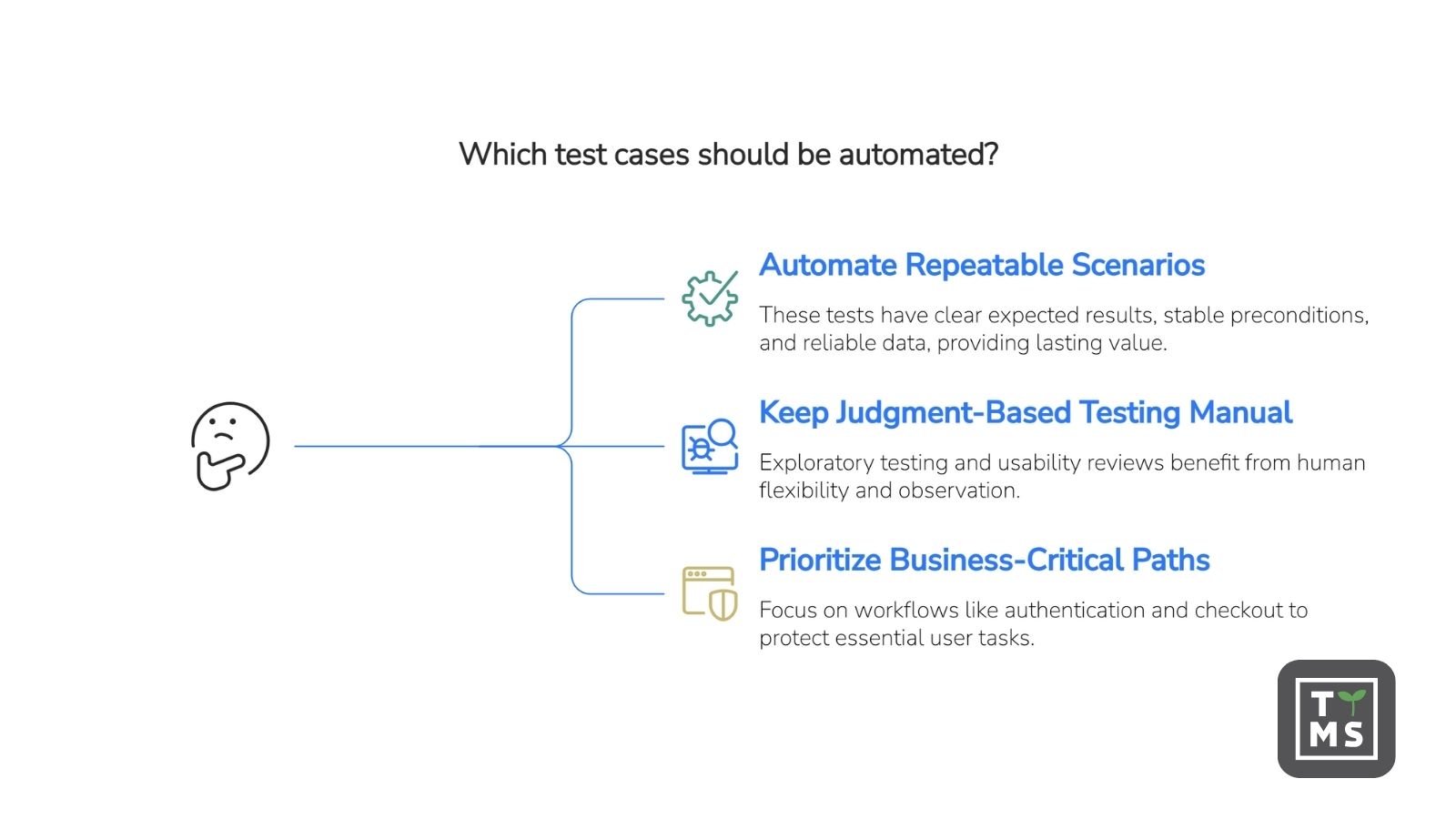
Strong candidates are usually repeatable scenarios with clear expected results, stable preconditions, reliable test data, and a meaningful impact on release confidence. A frequently executed test may be valuable, but frequency alone is not enough. Teams should also consider whether the scenario can be executed consistently and whether its expected outcome can be verified without subjective interpretation.
2.2 Keep Judgment-Based Testing Manual
Exploratory testing, first-impression usability reviews, visual assessments, and scenarios that depend heavily on human interpretation are usually better handled manually. Automating these activities can remove the flexibility and observation that make them valuable.
Rarity alone should not exclude a test from automation. An unusual scenario may still deserve automated coverage when a failure could interrupt a critical process, compromise data, or create significant operational risk. The decision should reflect business impact as well as execution frequency.
2.3 Prioritize Business-Critical User Paths
After unsuitable candidates have been removed, rank the remaining tests by business impact and regression risk. Authentication, checkout, account access, approvals, and core transaction flows are common priorities because failures can prevent users from completing essential tasks.
Starting with these workflows allows the automation suite to protect the parts of the application that matter most. Lower-impact scenarios can be added later when their expected value justifies the development and maintenance effort.
3. Match the Automation Approach to the Application and Team
Once teams have identified the right candidates for automation, they need to choose an approach that fits the application, delivery model, and available skills. The decision should balance execution speed, maintainability, technical control, accessibility for QA, and the effort required to integrate automation with the existing development workflow.
3.1 Use the Test Pyramid to Balance Feedback and Coverage
The test automation pyramid remains a useful starting point. Fast unit tests usually form the broadest layer, integration and service-level tests verify interactions between components, and a smaller set of end-to-end tests validates complete user journeys.
The exact proportions should reflect the application architecture and its risks. A system built around multiple services may need stronger integration coverage, while a business application may require more end-to-end validation of critical workflows. The goal is to detect problems at the lowest practical level while retaining enough end-to-end coverage to confirm that essential user journeys work as expected.
3.2 Choose Between Code-Based, Codeless, and Hybrid Automation
Code-based automation provides direct control over test architecture, integrations, reusable components, and repository conventions. It is often appropriate when a team has strong engineering skills, complex testing requirements, or an established automation framework.
Codeless and low-code approaches reduce the amount of scripting required to define common test scenarios. They can make automation more accessible to manual testers and domain specialists, although teams should still evaluate how the platform handles complex logic, maintenance, version control, and code ownership.
A hybrid approach combines accessible test definition with standard code-based automation. QA professionals can define and review test intent, while automation engineers maintain technical standards and review the resulting code. This model can reduce handovers without limiting the team to a proprietary execution format.
3.3 Evaluate Technical Fit and Long-Term Ownership
The right methodology depends on what the team is testing and who will maintain the automation. Complex backend behavior and service integrations may require direct technical control, while repeatable web user journeys may be suitable for higher-level automation.
Teams should also consider where generated automation will run, whether the output can be reviewed in the existing repository, how results return to the QA workflow, and whether the chosen approach supports the organization’s deployment and security requirements. Tool popularity matters less than alignment with the team’s application, skills, governance model, and long-term maintenance responsibilities.
4. Design Test Automation for Maintainability
Script and framework design have a major influence on long-term reliability, regardless of the selected tool. Maintainable automation separates reusable technical components from test intent, follows consistent repository conventions, and makes failures easier to understand and repair.
4.1 Using Stable Locators and Resilient Element Selection
Locators based on visual position, generated identifiers, or deeply nested DOM paths can break when the interface changes. Where possible, teams should use selectors based on stable and meaningful attributes, such as dedicated test identifiers, accessible roles, labels, or other elements that reflect how users interact with the application.
A locator should be both stable and specific enough to identify the intended element. The goal is not to eliminate maintenance entirely, but to reduce unnecessary failures caused by implementation details that are unrelated to the behavior being tested.
4.2 Apply Reusable Design Patterns
Patterns such as the Page Object Model can separate interactions with the application from the business logic being verified. When an interface element changes, the team can update the relevant reusable component instead of modifying every test that uses it.
The appropriate structure may also include component objects, shared fixtures, helper functions, reusable actions, and project-specific abstractions. Teams should select patterns that match the application architecture and apply them consistently across the repository.
4.3 Define Clear Assertions
Every automated scenario should include an explicit and observable expected result. A test that performs a sequence of actions without verifying the outcome may pass even when the underlying business process is not working correctly.
Assertions should confirm the intended behavior rather than incidental implementation details. Clear expected results also make test cases easier to review, automate, diagnose, and trace back to the original requirement.
4.4 Manage Test Data as a Dedicated Discipline
Test data should have clear ownership and a repeatable setup process. Data creation, seeding, reuse, protection, and cleanup should be considered when the test is designed rather than added after the script has already been implemented.
Teams should also avoid hidden dependencies on data left behind by earlier executions. Predictable test data makes failures easier to reproduce and reduces false results caused by stale, incomplete, or conflicting records.
4.5 Keep Tests Independent and Isolated
Automated tests should not depend on the order in which other tests are executed. Each test should begin from a known state and establish the preconditions required for its own scenario.
Isolation can be implemented through fixtures, controlled data setup, separate browser contexts, API-based preparation, environment resets, or cleanup procedures. When one test fails, that failure should not create misleading results elsewhere in the suite.
4.6 Follow Repository Conventions
Automation code should follow the same structural and quality standards as the rest of the project. Consistent naming, fixtures, helpers, hooks, error handling, formatting, and review rules make generated and manually written tests easier to understand and maintain.
Repository alignment becomes particularly important when automation code is generated rather than hand-written. Generated automation should fit the existing framework rather than introduce a parallel structure that the engineering team must maintain separately.
5. Integrate the Right Tests at the Right CI/CD Stage
Automated tests provide the greatest operational value when they are integrated with the delivery pipeline and return timely, actionable results to the people responsible for the change. The goal is not to run every test after every update, but to apply the right level of validation at each stage.
5.1 Match Test Scope to the Pipeline Stage
A staged pipeline balances feedback speed with test depth. Fast unit tests and static checks can validate individual changes early, while integration tests and a relevant regression subset can provide broader evidence during pull or merge request review. More extensive regression testing can run after changes are merged, before deployment, on a schedule, or when the risk of a release justifies wider coverage.
Smoke tests serve a different purpose. They verify that a deployed application is available and that its most critical user paths remain operational. They should complement, rather than replace, deeper regression testing.
The exact structure and runtime expectations should reflect the application architecture, infrastructure, release cadence, and business risk. Teams should define their own quality gates based on the type of change and the evidence required before it can move forward.
5.2 Select Tests Based on Change and Risk
Running the full suite for every code change can create unnecessary delays as automation grows. A more sustainable approach selects tests based on the components affected by the change, related requirements, business-critical workflows, previous execution results, and known areas of risk.
Test selection should remain transparent. Teams need to understand why a test was included or excluded and should be able to expand the scope when a change has wider implications than the initial analysis suggests.
This staged, risk-based structure is also the foundation that AI-driven test selection and prioritization build on. If you’re looking at how AI fits into this part of the pipeline specifically, see our guide, AI in Software Test Automation: 2026 Guide.
5.3 Return Actionable Results to the Workflow
Test execution should produce more than a pass or fail status. Results should identify the affected scenario, provide enough evidence to investigate a failure, and remain linked to the relevant requirement, test case, code change, and execution record.
Returning results to the pull or merge request helps engineering teams review automation alongside the application change. Returning them to the QA layer and requirement source gives QA teams traceability from test intent through code to execution. This closes the feedback loop and supports informed release decisions.
6. Treat Test Maintenance as a Continuous Engineering Process
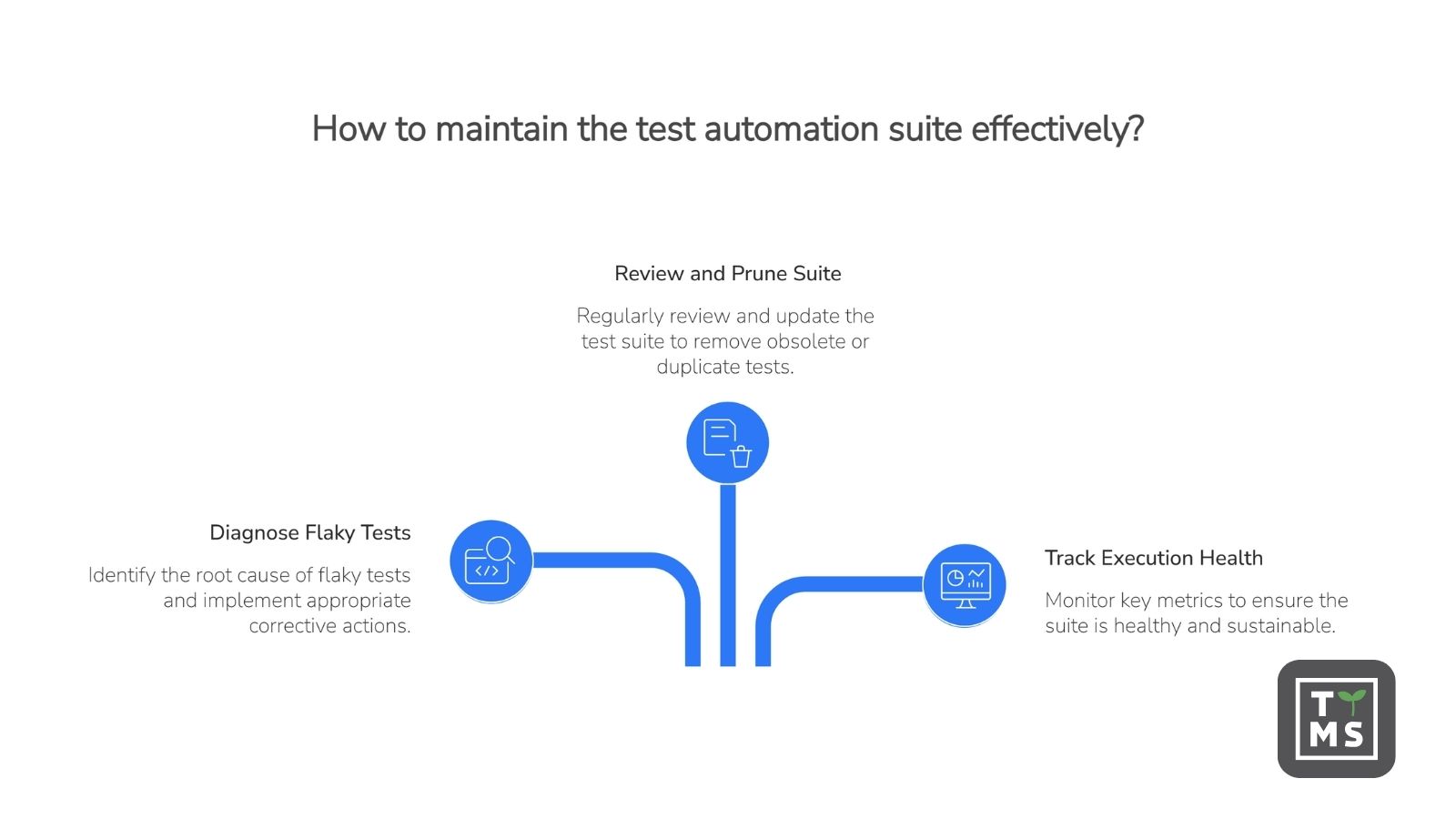
Flaky tests can quickly undermine confidence in an automation suite. When the same test passes and fails without a relevant application change, teams may begin treating failures as noise. Rerunning the test can unblock a pipeline temporarily, but it does not resolve the underlying problem.
6.1 Diagnose the Root Cause of Flaky Tests
Flakiness can originate in the test code, application, test data, execution environment, or an external dependency. Common causes include fixed delays, missing synchronization, unstable locators, shared state between tests, conflicting test data, asynchronous application behavior, network variability, and resource constraints in the execution environment.
The corrective action should match the source of the problem. Timing failures may require condition-based waits rather than longer fixed delays. Shared-state failures call for stronger isolation and controlled data setup. Selector failures may require more stable locators or reusable application abstractions. Failures caused by external dependencies may require controlled test environments, mocks, or other ways to reduce unnecessary variability.
Teams should capture enough information to distinguish a product defect from a test defect or an environment failure. Execution traces, logs, screenshots, videos, network activity, environment details, and the affected test step can make intermittent failures easier to reproduce and diagnose.
6.2 Review and Prune the Test Suite Regularly
Automated tests should be reviewed throughout their lifecycle. Product changes can make tests obsolete, duplicate existing coverage, or reduce their business value. Keeping every test indefinitely increases execution time and maintenance effort without necessarily improving release confidence.
A defined maintenance cadence should include reviewing flaky tests, retiring obsolete scenarios, consolidating duplicate coverage, and reassessing tests whose business impact or technical stability has changed. The frequency should reflect the size of the suite, release cadence, application risk, and volume of product changes.
Each test should have a clear outcome after review. It may be repaired, rewritten, moved to a more appropriate test layer, temporarily isolated with an assigned owner, or removed when it no longer provides useful evidence.
6.3 Track Execution Health and Maintenance Effort
Pass rate alone does not show whether an automation suite is healthy. Teams should also monitor recurring failures, rerun frequency, execution duration, maintenance effort, obsolete tests, duplicated coverage, and the time required to identify and repair a failure.
These signals help distinguish a growing automation suite from a sustainable one. Adding tests increases coverage only when the team can understand the results, maintain the assets, and trust the evidence produced by each execution.
Maintenance decisions should also remain traceable. Teams need visibility into what changed, why a test was updated, how the change was reviewed, and whether the revised test still validates the original requirement.
We will discuss this lifecycle-based approach in our article: Best QA Practices in Software Testing.
7. Treat Automation Code as Production Code
Automation code should follow the same engineering standards as application code. Tests need clear ownership, version control, consistent repository conventions, review rules, and quality gates. Without these practices, scripts become difficult to understand, update, and trust as the application evolves.
Ownership should cover both test intent and technical implementation. QA professionals can define the business scenario, expected result, and required coverage, while automation engineers or developers verify that the resulting code follows project conventions and can be maintained within the existing framework.
Whether automation is written manually or generated with the help of AI tooling, it should enter the repository through a standard pull or merge request. Reviewers should be able to inspect what the test validates, how it interacts with the application, which reusable components it uses, and whether it introduces unstable dependencies or duplicated coverage.
Generated tests should not remain inside a proprietary execution environment when code ownership and portability matter to the organization. Keeping automation in the client’s repository makes changes visible, reviewable, and subject to the same governance as other project assets.
Teams should also define who responds when a test becomes unstable or outdated. Clear ownership prevents failed tests from remaining unresolved because QA, development, and automation teams each assume that another group is responsible.
8. Where AI Fits Into This Process
AI is increasingly used alongside these practices — drafting test cases from requirements, verifying that a proposed path actually works before code is generated, and flagging tests that are likely to become unstable. Getting this right is less about the automation practices covered above and more about strategy, tooling, and governance, so we cover it separately in depth in AI in Software Test Automation: 2026 Guide.
9. Common Test Automation Mistakes to Avoid
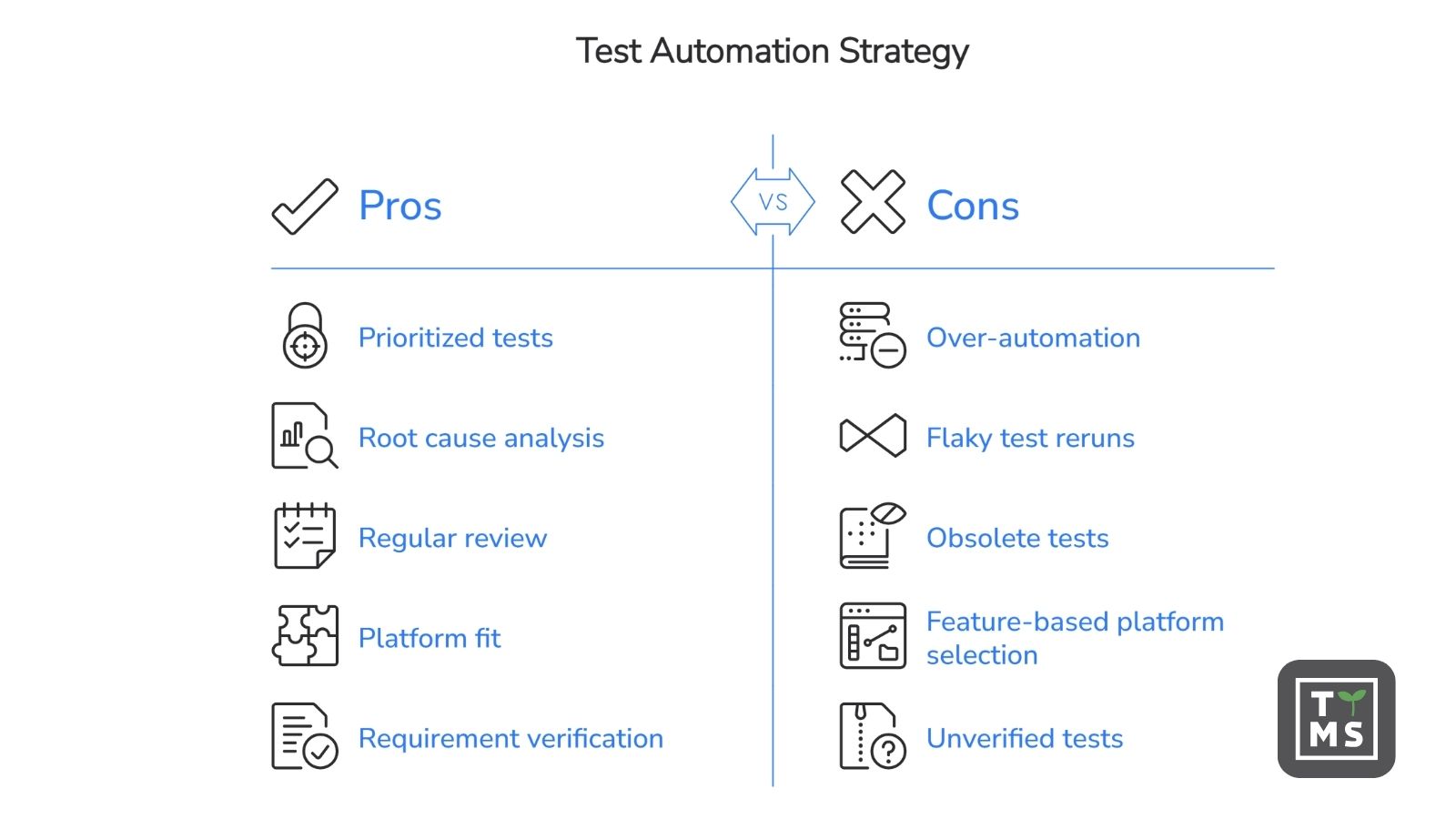
Even a technically sound automation program can lose value when teams make poor decisions about scope, ownership, and maintenance. Common mistakes include:
Automating every available scenario instead of prioritizing repeatable, stable, and business-critical tests.
Treating reruns as a permanent solution to flaky tests rather than investigating their root causes.
Allowing obsolete and duplicated tests to remain in the suite without regular review.
Selecting a platform based on feature count without evaluating integration, maintainability, deployment, code ownership, and team fit.
Generating automation without first verifying that the test scenario works against the actual application.
Accepting generated tests without checking whether they reflect the original requirement and intended business behavior.
Keeping automation in a proprietary environment when the organization requires reviewable, portable code in its own repository.
Managing test scripts outside standard version control, code review, and CI/CD quality gates.
Leaving responsibility for test intent, code quality, and ongoing maintenance undefined.
Avoiding these mistakes requires more than adding tools or scripts. Teams need a controlled workflow that connects requirements, test design, execution evidence, automation code, review, and maintenance.
10. How Qatana Applies These Test Automation Best Practices
Qatana brings these practices together in an agentic test automation platform. It turns Jira or GitLab requirements into automation-ready test cases, verifies the proposed user path through Playwright execution, and generates standard Playwright code delivered through a pull-ready merge request.
QA retains control of test intent, while engineering reviews the generated automation through the existing merge request process. Execution results remain linked to the requirement, test case, and code, providing traceability across the workflow.
Qatana runs entirely on-premise and supports the organization’s selected LLM, keeping project context, generated code, and test evidence within the customer’s environment.
Book a demo to see how Qatana turns requirements into execution-validated Playwright automation.
11. Frequently Asked Questions
How much of my test suite should be automated?
There is no universal target. Prioritize stable, repeatable, and business-critical scenarios, while keeping exploratory and judgment-based testing manual.
What is the difference between a test automation strategy and a framework?
A strategy defines what to automate, why, and how success will be measured. A framework is the technical structure used to build, execute, and maintain automated tests.
How do I know if my automation ROI is positive?
Compare the time and effort saved through automation with implementation, execution, and maintenance costs. If maintenance consistently outweighs the benefits, review the selected tests and automation approach.
What’s the most common reason automation programs stall after an initial pilot?
Usually a lack of ongoing ownership rather than a tooling problem. Teams automate an initial batch of tests successfully, but without a defined maintenance cadence, clear code ownership, and a repository review process, the suite accumulates flaky and obsolete tests faster than anyone repairs them, and confidence in the results erodes.